
These release notes describe the changes made to Bp VIP.net since Topaz SP3 build 2.1.536.032.
|
Release Date |
TBC |
|
Notes last updated |
12 June 2026 |
|
What is in this release? |
Bp VIP.net 2.1.539.015 contains bug fixes, new features and enhancements. |
|
What version can I upgrade from? |
You should be able to upgrade to 2.1.539.015 from any version of Bp VIP.net. Users updating from Topaz Revision 2 (2.1.526.057) or lower will need to update the .NET Framework to version 4.8 before updating Bp VIP.net. |
System Requirements
Windows Server 2012 and 2012 R2 end of support
- Microsoft support for Windows Server 2012 and 2012 R2 ended on October 10, 2023. Best Practice Software recommends users running Bp VIP.net on Windows Server 2012 or 2012 R2 upgrade to a supported Windows server operating system. See the Bp VIP.net System Requirements and the Microsoft website for further details.
Webview2 installation
- The Webview2 install required for Bp VIP.net is included in the Bp VIP.net installer from version Topaz SP1 Revision 3 onwards, and will run silently in the background when users perform Bp VIP.net updates. Best Practice Software recommends installing Webview2 manually for users updating Bp VIP.net on terminal servers. See Download and Install Webview2 for further instructions.
Microsoft .Net Framework version 4.8
- Check the version of Microsoft .NET Framework on the Bp VIP.net server and workstations. Bp VIP.net version Topaz SP1 Revision 2.1 or higher requires a minimum .NET Framework version of 4.8.
- If you did not upgrade to the most recent version Topaz SP3 (2.1.536.032), review the release notes to see the changes in that version.
- Before running the Bp VIP.net installer, Best Practice Software recommends to stop VIPServices.net from Windows Services and restart the services again after the update is complete. See Configure and Start VIP Services for further instruction.
- Best Practice Software recommend that the upgrade be performed outside of normal business hours.
- Go to Help > What's New.
- Right-click the upgrade zip file link and select Save Link As or Save Target As under the heading for Bp VIP.net Topaz SP4 (2.1.539.015).
- Double-click the file to begin the installation. The Bp VIP.net InstallShield Wizard will open at the Welcome panel.
- Click Next to begin.
TIP You can also download the upgrade zip file from the Bp VIP.net Downloads page. If you are a beta user the installation file will be provided to you by Best Practice Software directly.
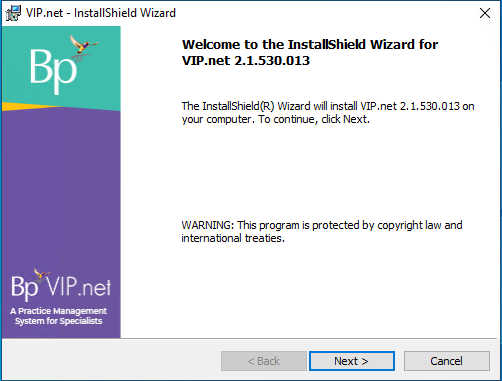
See Install Bp VIP.net for full instructions.
- Log in to the Bp VIP.net server computer as a Windows administrator. You may require Windows administrator permissions to install and update some Bp VIP.net components.
- If your practice uses a MIMS database, check your version of MIMS and update to the latest version if available.
- After completing the upgrade, Best Practice Software recommends restarting VIPServices.net. See Configure and Start VIP Services for further instruction.
- Check the new features, enhancements and bug fixes below for any required configuration.
Compliance
Bulk Bill Claiming Updates
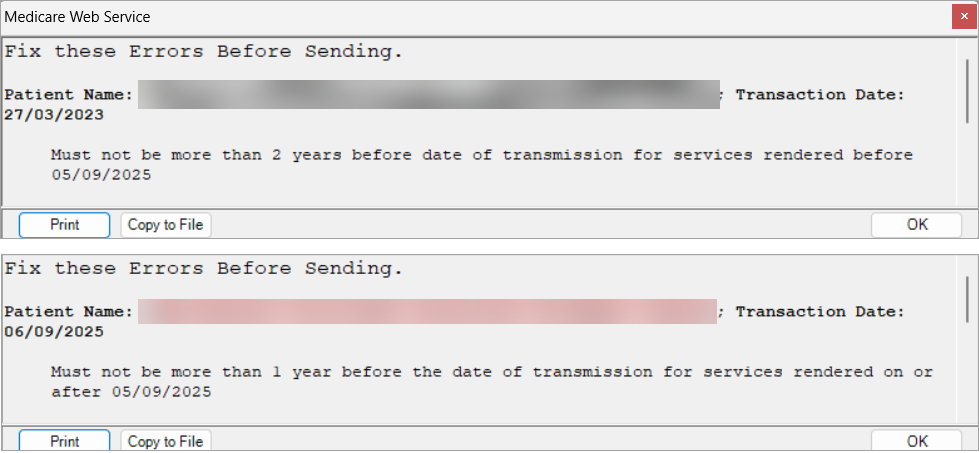
From 05 September 2025 the following Bulk Bill claims will not be accepted by Medicare:
- Claims with a Medical Event Date greater than 2 years in the past for service rendered before 5 September 2025.
- Claims with a Medical Event Date greater than 1 year in the past for service rendered on or after 5 September 2025.
Assignment of Benefit Reforms 01 July 2026
From 1 July 2026, the Medicare Assignment of Benefit (AoB) process will undergo a major digital transformation, supported by legislative changes and the need for more secure and efficient healthcare billing.
Assignment of Benefit (AoB) refers to the process by which a patient authorises Medicare to pay their benefit directly to the healthcare provider, rather than reimbursing the patient.
In Bp VIP.net, new radio buttons have been included to indicate Implied or Requested Assignment of Benefits for IMC claims, and the DB4 Bulk Bill Assignment of Benefit Agreement form has been updated to include the new required fields.
NOTE For more information see the Australian Government Department of Health, Disability and Ageging (DoHDA) website, or the Knowledge Base articles Assignment of Benefit and Assignment of Benefits FAQs.
Long Acting Reversible Contraceptives
From 1 November 2025, changes were made to MBS LARC items. Changes include:
- Increasing fees for four existing LARC insertion and removal items (35503, 35506, 14206, a 30062)
- Introduction of new items for Nurse Practitioners to claim when inserting or removing LARCs (new items 82201, 82202, and 82203).
- Introduction of new loading items (new item 35501 for GP and Specialist use and new item XXXXX for NP use)
The loading items provide a ‘loading’ of 40% of the fee for the relevant LARC administration item, when a patient’s LARC insertion or removal service and any concurrent consultation or MBS items associated with providing the service are bulk billed.
For the loading item to be payable, the patient cannot be charged any out-of-pocket costs for any MBS items claimed in the LARC insertion or removal appointment, including any co-claimed items relating to provision of the LARC service.
To claim the loading, providers must ensure all item requirements are met, bulk bill the patient for every MBS item they claim in the LARC appointment, then claim the relevant LARC item and co-claim the loading item.
Updates have been made in Bp VIP.net Topaz SP4 to support these changes.
ePrescribing Updates
eScript Token Sending
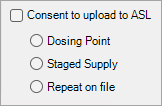
eScript tokens can now be sent when the Consent to Upload to ASL checkbox is not selected.
This enables patients who do not wish for their prescriptions to be uploaded to Active Script List (ASL) in MySL to receive eScript tokens.
Reauthentication in the Audit Log
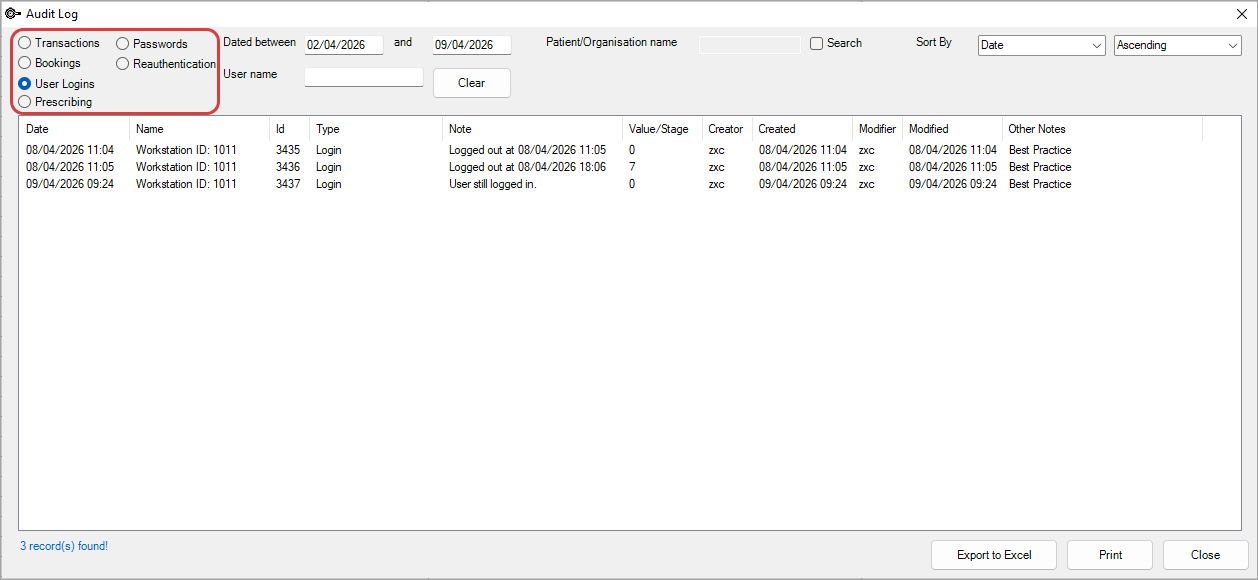
New option for 'Reauthentication' added to the Audit Log to record when a provider has re-entered their login details when prescribing Schedule 8 medications.
Preview Medications Window
Updates made to the way information is displayed in the Preview Medications window when prescribing with eRx to ensure compliance with AIP.
Added fields to the Preview Medications window to ensure compliance with AIP:
- Indication of PBS, RPBS, or Private in the Medication column.
- Annotation of Note to Pharmacist, Dr Note, or Prescribing Reason in the Medication column.
- Quantity display in numerical and alphabetical format in the Medication column.
- MySL Consent to be displayed as Yes or No.
- CTG? field added to be displayed as True or False.
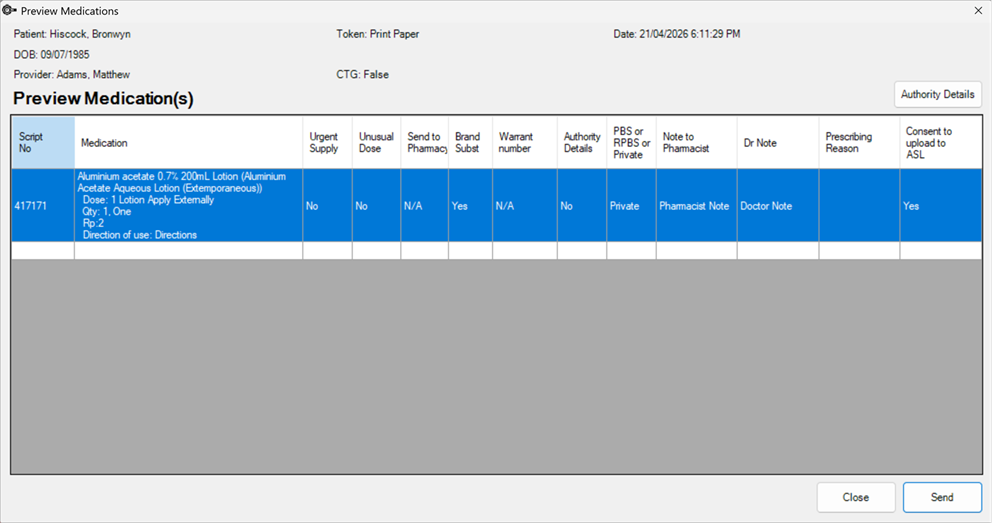
IMPORTANT The Closing the Gap (CTG) field must be manually added to the Patient Details (F3) screen to indicate eligibility on the prescription.
To add the CTG? field to Patient Details:
- Navigate to Setup > User Defined Forms.
- Select AUSNumbers and click Modify.
- Click the Preset button in the top left corner of the Form Designer menu. There must be enough space on the form to fit the new field.
- From the Insert Preset Field screen, select the Patient/Org radio button.
- From the Patient menu, double click the CTG? field, or click Insert.
- Make any changes to the CTG? field as desired in the Modify CheckBox screen such as assigning a Hotkey.
- Click OK.
- Close the Insert Preset Field screen to place the CTG? field on the Patient Details UDF.
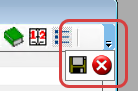
- After placing the field, click the downward arrow in the rightmost corner of the Form Designer menu and click the floppy disk Save icon to save and close.
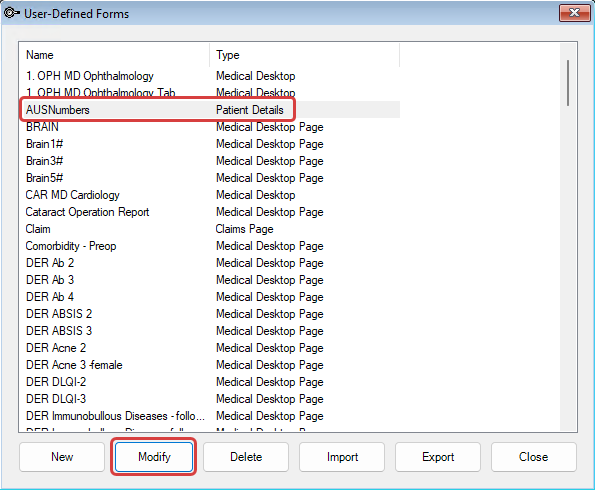
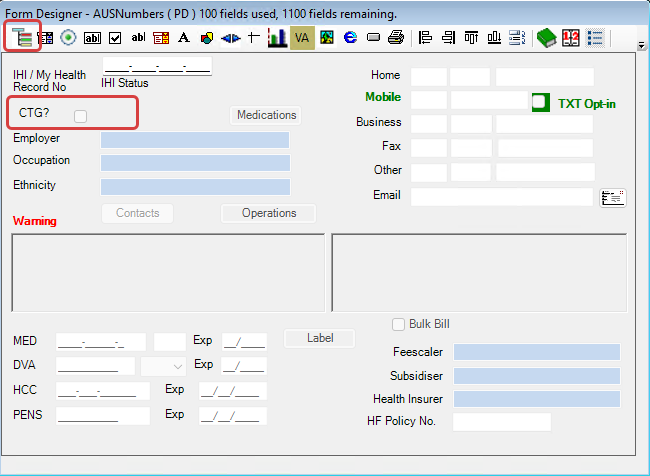
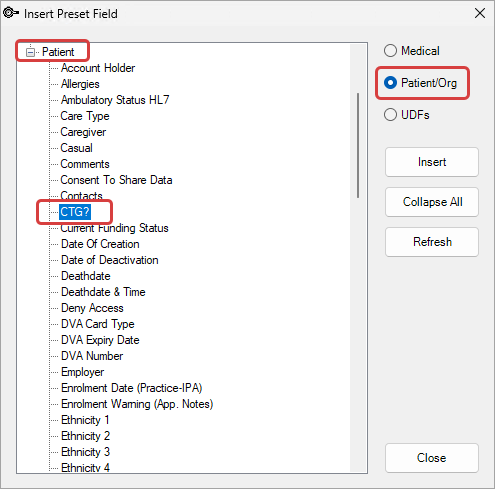
When the CTG field is selected in the Patient details screen, it will be automatically selected and disabled from editing in the Prescriptions window.

NOTE See the Knowledge Base article Create a UDF for more information about User Defined Forms. See the Closing the Gap website to learn more about the National Agreement.
Enhancements
Exporting Financials
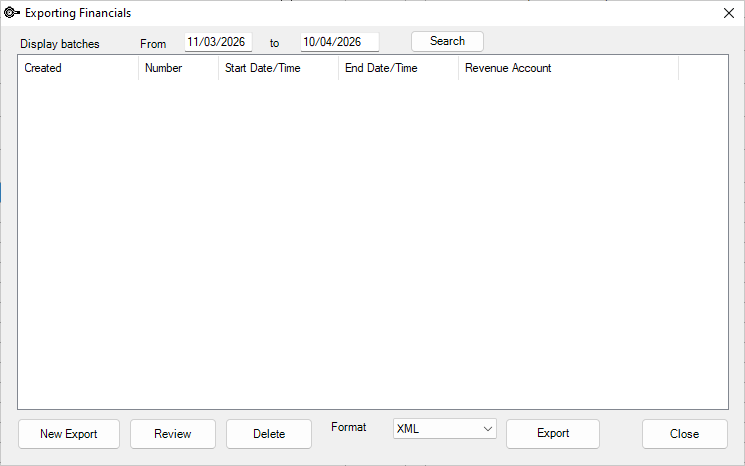
New fields have been added to the Exporting Financials tool accessed from File > Accounts > Export.
- Users can now set a From and To date range to filter results.
- The screen will show batches from the current month by default.
- These changes are also intended to reduce screen loading times.
Keyboard Shortcuts
The following keyboard shortcut have been added into Bp VIP.net:
|
Area |
Function |
Shortcut |
|---|---|---|
|
Incoming Correspondence Details / Incoming Referral Details
|
Scan |
Alt + N |
|
Image/Document |
Alt + M |
|
|
Print/Send |
Alt + E |
|
|
Ext Viewer |
Alt + V |
|
|
Log Details |
Alt + G |
|
|
OK |
F12 |
|
|
Cancel |
Esc |
|
|
Incoming Referral Details Window - Radio buttons |
Normal |
Alt + A |
|
Emergency |
Alt + Y |
|
|
In-Hospital |
Alt + H |
|
|
Lost |
Alt + L |
|
|
Non-Referred |
Alt + O |
|
|
Medical Desktop (F11) Film Strip |
Import |
Alt + R |
|
Medical Desktop
|
Save/Refresh |
Alt + V |
|
Save/Close |
F12 |
|
|
Film Strip Image Properties
|
Tag |
Alt + T |
|
OK |
F12 |
|
|
Cancel |
Esc |
|
|
UDF Field: Problems |
Ongoing |
Alt + G |
|
Details |
Alt + I |
Aged Debtors
Significant improvements have been made in the return of data when running Provider or Debtor reports. As a result, the debtors' reports may take longer to run.
NOTE See the Aged Debtors article for more information.
Manually Update Gold Coin in the Appointment Book
Updates have been made to Bp VIP.net to allow the user to manually update a red coin in the appointment book to a gold coin removing the need to call support.
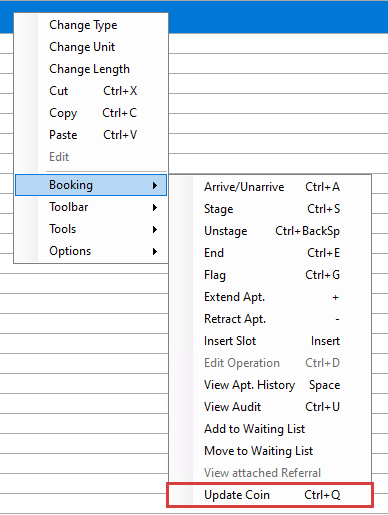
- Right-click on a booking and go to Booking > Update Coin (Ctrl+Q).
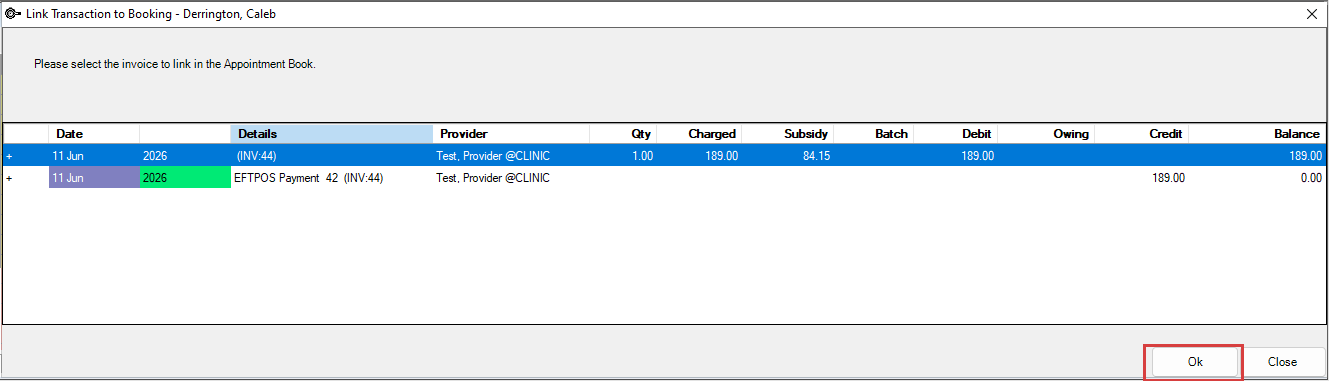
- From the Link Transaction to Booking screen, select the correct invoice to link to the booking and click OK.
- The coin in the Appointment book will be updated from red to gold.

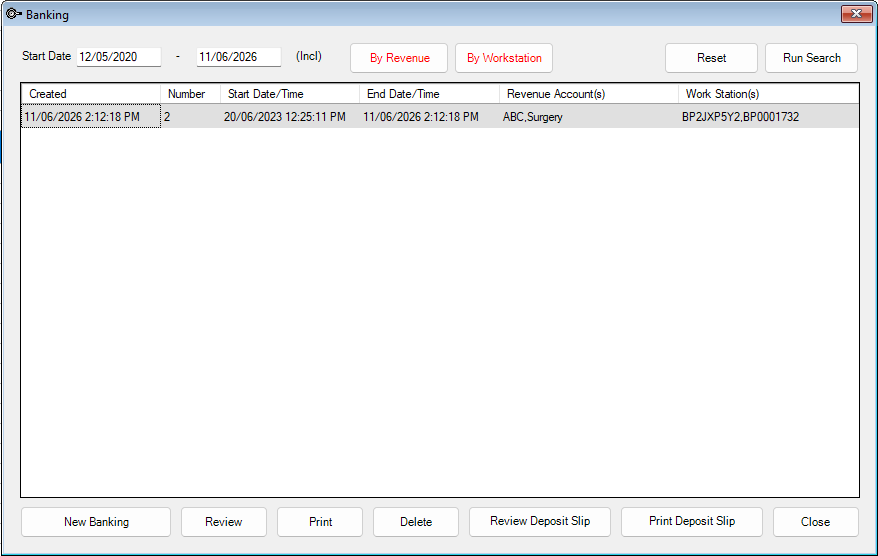
Banking Search Filters
The following filtering options have been added to the Banking screen accessed from File > Accounts > Banking:
- Date Field - From
- Date Field - To
- By Workstation
- By Revenue
- Reset
- Run Search
Other Enhancements
|
Function |
Release Notes |
Key |
|---|---|---|
|
3M DRG Grouper |
The 3M URL has been updated in Bp VIP.net. |
82346 |
|
Appointment Book Report |
An additional Sort option for Date and Time has been added to the Appointment Book Report. |
70549 |
|
Community Health Program |
Updates have been made to the Community Health Program for users in Victoria to warn the user about Mandatory Reporting Requirements if the first Health Condition field is empty. |
82823 |
|
Credit On Hold |
Updates have been made to improve the way COH Transfers and Refunds are handled in Bp VIP.net. |
80284 |
|
|
Updates have been made to the email screen to stop the form from reopening after sending emails. |
81640 |
|
Facility Preferences |
From Setup > Facility Preferences > General Preferences > Appointment Book 1, new information button has been added next to the Allow immediate end of Appointment from this stage? setting to provide more information to users about this function. When clicked the information screen will open and display the following text: This setting allows appointments to be automatically ended when they are charged. The appointment will automatically end if the stage that it is staged to has been setup to allow ending. You can view and update these settings under the 'Appointment Book 2' tab. The setting is 'Allow immediate end of Appointment from this stage?' found by clicking the settings button to the right of the stage. |
82432 |
|
HI Search |
Changes have been made to the Healthcare Identifiers window to include the IRN field as mandatory in accordance with Medicare updates. |
78956 |
|
HI Search |
Updates have been made to the display message in the pop-up window when a retired IHI status is returned for a patient in accordance with Medicare updates. |
78957 |
|
Insert Fields |
Updates have been made to the Insert fields (Ctrl +L) for Chosen Visit Notes and Last Visit Notes to honour the formatting including spaces as it is entered in the Medical notes. |
74766 |
|
Invoicing |
A business rule has been added to Setup > Charges > Select item > Pre-defined Rules called ‘Professional attendance billed’ that can be applied against any item to trigger a warning to the user when billed in conjunction with a procedure code. |
71635 |
|
Letter Recipients |
Provider Role as indicated in the Patient Details (F3) is now displayed beneath the Provider Type when selecting letter recipients. |
67034 |
|
Live Update |
Updates have been made to Live Update to include the Last Updated Date when running Health Fund fee updates for NIB. |
79055 |
|
Live Update |
Updates have been made to Live Update to correctly align the Gap and No Gap fee columns. |
81723 |
|
Live Update |
Updates have been made to resolve issues with Medibank fees not being correctly applied to Health Funds when using the Live Update utility. |
82197 |
|
Medical Desktop |
User can now navigate through full size images in the Filmstrip using the arrow keys to view the next or previous image. |
77039 |
|
Medicare Claiming |
A new warning message has been added in the Transactions screen when a user attempts to modify an invoice that has been rejected by Medicare before resubmitting: 'This invoice has been rejected. Please resubmit before making modifications.'. |
74844 |
|
Medicare Claiming |
The Send Claim (PCI) button will now be disabled after it is clicked. This stops the claim from being sent multiple times resulting in an error 'Duplicate of service already paid.'. |
77030 |
|
MBS Items Numbers |
Updates to the hardcoded list of linked item numbers for item 31340 have been made to include the following: 31000, 31001, 31002, 31003, 31004, 31005, 31356, 31358, 31359, 31361, 31363, 31365, 31367, 31369, 31371, 31372, 31373, 31374, 31375, 31376, 31377, 31378, 31379, 31380, 31381, 31382 ,31383. |
81648 |
|
My Health Record |
The Check My Health Record button has been removed from the My Health Record screen as the check is now done automatically. |
51025 |
|
MyComms |
An additional column has been added to the Log Details in MyComms for the Messaging Provider where RSD messaging is used. |
70900 |
|
MyComms |
A new button Forward Correspondence has been added to MyComms to forward incoming correspondence. Letters will be prefaced with FW: in the Subject/Reason field. |
71184 |
|
MyComms |
The Date Field: To has been added to the MyComms screen when searching for letters by date to be used in conjunction with the existing Date Field: From. |
78180 |
|
MyComms |
Automatic tasks performed by the system will now show in Log Details as VIP System instead of the first logged in user of the day. |
78793 |
|
MySL |
Updates have been made to MySL to remove restrictions to only display 20 medications at a time. |
83155 |
|
Quotes |
Updates have been made to the way that quotes are displayed in the Transactions (F8) screen. The quote number in brackets will now display as (Q: 12345) instead of (INV:12345). |
80528 |
|
Tasks |
The ability to search for a user by first name has been added to the Tasks screen. |
78732 |
|
Tasks |
Updates have been made to the Tasks screen to display a warning to a user if they are replying to an inactive user. |
81044 |
|
User Defined Forms |
A new right-click menu option has been added to fields in User Defined Forms, Copy Value to Latest Note. When selected, the value in the field will be copied to the same field in the most recent medical note. |
67875 |
Bug fixes
|
Function |
Release Notes |
Key |
|---|---|---|
|
Access Rights |
When a user had Recalls access disabled under the Medical permission, access for the Next Appointment Recall Report was also incorrectly disabled. This error has been resolved. |
77868 |
|
Aged Debtors Report |
When an Aged Debtors Report was run with filters for 90 days grouped by Debtors, the report would fail to run and display an 'Index was out of range' error. This error has been resolved. |
80515 |
|
Aged Debtors Report |
An issue has been resolved with the Aged Debtor Report incorrectly showing patients as owing or in credit for redirected invoices. |
80785 |
|
Aged Debtors Report |
When using the filters for All, 30 days, 60 days and 90 days, and grouping by Debtors, the Aged Debtors Report would not correctly display debtors occurring in the date range specified. This error has been resolved. |
81190 |
|
Aged Debtors Report |
When adding payments to a quote created outside of the current month the transaction would incorrectly display in the Aged Debtors Report. This error has been resolved. |
81529 |
|
Aged Debtors Report |
An error has been resolved in the Aged Debtors Report where outstanding balances would appear in the report unallocated to a debtor. |
81895 |
|
Aged Debtors Report |
When using the Report on filter in the Aged Debtors screen filtering by Debtors only, all outstanding amounts were not displayed. This issue has been resolved. |
81907 |
|
Appointment Book Summary |
When printing the Appointment Book Summary or exporting the results to Excel, the column for stage 5 was not included. This error has been resolved. |
78824 |
|
Audit Log |
When a user made changes to their password the details were not correctly recorded in the Audit Log. This error has been resolved. |
82645 |
|
Autotext |
An issue has been resolved where the default autotext would repopulate in the SMS preview after selecting an autotext template. |
80236 |
|
Credit On Hold |
When applying two credit on hold payments to a single quote the balance would double. This error has been resolved. |
80438 |
|
Credit On Hold |
When applying credit on hold to a redirected invoice the credit on hold payment would still exist as available credit. This issue has been resolved. |
80719 |
|
Credit On Hold |
When reversing a redirected quote with a payment attached the transactions would display in the Aged Debtors Report incorrectly. This issue has been resolved. |
81037 |
|
Daystay Episodes |
When the Mode of Separation was set to '01 Discharge by Hospital' Bp VIP.net would incorrectly require a value for Hospital Transferred To as mandatory. This error has been resolved. |
80646 |
|
DVA Claiming |
An error has been resolved where users entering a DVA War Code that begins with two alphabet characters would receive a Medicare Web Services error stating that the code was not valid. |
78961 |
|
|
Previously when using the Attach Files feature when creating an email files could only be attached individually. This issue has been resolved and multiples files can now be attached to an email at once. |
75567 |
|
|
Errors have been resolved with the Bcc field when sending emails where an unexpected error would occur if only the Bcc field was populated or the email recipient of the Bcc field would not receive emails addressed to them when the To and Cc fields were populated. |
80558 |
|
eScripts |
When selecting No Token (MySL) as the token method for an ePrescription, the Preview Medications window would incorrectly display the token method as Print. This issue has been resolved. |
79997 |
|
eScripts |
An error has been resolved where eScripts for Vabysmo were rejected by the pharmacy due to insufficient information on the prescription. |
80780 |
|
eScripts |
An error has been resolved where Bp VIP.net would appear to successfully send an eScript via SMS but the recipient did not receive the text message. This error has been resolved. |
82254 |
|
eScripts |
An error has been resolved where users were able to send through eScripts without an HPI-I number in the Provider details. |
82400 |
|
File Numbers |
Issues have been resolved with automatic filing numbers when a lead provider is changed. |
69345 |
|
File Numbers |
An issue has been resolved where the function to Check for duplicate file numbers was not applied to manual file numbers. |
75291 |
|
File Numbers |
When automatic file numbering was selected using provider prefixes sequentially per provider, patients would not have a file number created for them if a new provider was added and selected as the lead provider. This issue has been resolved. |
78826 |
|
Financial Summary |
When running the Financial Summary report and using the Inclusive/Exclusive and GST filtering options, results did not correctly display the text to indicate GST in the item description. This error has been resolved. |
81245 |
|
General |
When updating Bp VIP.net with an older database an error would occur 'Error upgrading database: Invalid column name "WarningSizeLimit". This error has been resolved. |
80712 |
|
Healthlink |
An error has been resolved where the Message Type option for Healthlink RSD Messaging - HL724 was not available to select in Message Format Details for Healthlink for New Zealand users. |
80460 |
|
HI Lookup |
An error has been resolved with HI Lookup where the patient name field length was populated with additional unnecessary spaces. |
81933 |
|
ICD10 Conversion Tool |
When using the ICD10 Conversion Tool for TAS and QLD ICD10 13th Edition an error would occur 'There are some errors when converting ICD10 column "UnacceptPDx' does not belong to the table'. This error has been resolved. |
80923 |
|
IHC Claiming |
An error has been resolved with claiming for NIB insurance due to incorrect service codes. |
80292 |
|
Live Update |
When importing item codes through Live Update an error would occur "String was not recognised as a valid DateTime". This error has been resolved. |
79516 |
|
Live Update |
An error has been resolved where WAGMSS Health Fund fees were incorrect. |
81957 |
|
Maintain Stock |
An error has been resolved where Bp VIP.net would freeze and unexpectedly crash when editing stock items. |
79515 |
|
Medical Recalls Report |
When printing the Medical Recalls Report, the Location column would display on a separate page. This issue has been resolved. |
80566 |
|
MyComms |
An error has been resolved where letters were being sent to incorrect recipients. |
74011 |
|
MyComms |
When printing a scanned PDF from MyComms Incoming Correspondence or Referrals Bp VIP.net would unexpectedly close without warning. This error has been resolved. |
77851 |
|
MyComms |
An issue has been resolved in the MyComms Log Details where providers who were not selected to be emailed would incorrectly display as successfully emailed. |
79149 |
|
MyComms |
When using an external letter database, files would not be created in the external database when importing documents via HealthLink. This error has been resolved. |
79163 |
|
MyComms |
An error has been resolved in MyComms in the Incoming Investigations screen where Abnormal results were not displayed until the Abnormal checkbox was enabled. |
81074 |
|
Patient Details |
If an IHI number was updated in the Patient Details (F3) screen with an incorrect number, an error would occur after the HI verification check was completed where the incorrect number would save to the patient record and the user could not exit the screen due to an invalid number warning. This issue has been resolved. |
79091 |
|
Patient Details |
When opening a Patient Details Page screen from the Patient Details (F3) and changing the patient in the snapshot with this screen still open, the Medical Desktop would become locked under the user’s name. This issue has been resolved. |
74839 |
|
PCI Claiming |
When applying discounts to PCI claiming invoices with credit on hold or payments the payment would incorrectly be allocated showing patient contribution only to one item. This issue has been resolved. |
79982 |
|
PCI Claiming |
An error has been resolved with assistant code claiming "Error code 9618: Either an amount has not been entered in the charge field or an invalid amount has been entered" preventing users from claiming when correct processes have been followed. |
80003 |
|
Prescribing |
When selecting a Saved default the Quantity field would not populate with the Saved default value. This issue has been resolved. |
79088 |
|
Prescribing |
An error has been resolved where increasing the quantity of a custom medication would result in Bp VIP.net prompting the user "Increasing the quantity of drugs prescribed requires that an Authority be completed for this medication. Do you wish to continue?" incorrectly. |
80209 |
|
Protocols |
When selecting Add to Regulars checkbox for a Protocol the setting would not be applied when closing the medication window. This issue has been resolved. |
77066 |
|
Referrals |
Some users experienced an 'Unhandled exception' error when creating a new Referral. This error has been resolved. |
75188 |
|
RSD Messaging |
When sending RSD outgoing correspondence a warning message would incorrectly occur 'Note: Hyperlinks & Attached Documents are stripped out of the message For this RSD format and will Not be sent'. This error has been resolved. |
77852 |
|
RSD Messaging |
When creating outgoing correspondence to an external facility using RSD secure messaging HL7 files were not created in the Healthlink Outgoing directory. This issue has been resolved. |
80509 |
|
RSD Messaging |
RSD Messaging - HL7 has been reinstated in Bp VIP.net due to issues with files in Flatfile format. |
81112 |
|
Screening Terms |
When setting a Screening Term to 7 months Bp VIP.net would incorrectly add additional days to the cycle. This error has been resolved. |
77780 |
|
Shortcuts |
When using Ctrl + Space the shortcut would not load the appointment history of the patient in the snapshot as it did in previous versions of Bp VIP.net. This functionality has been restored. |
81270 |
|
SMS Automatic Profile |
An error has been resolved where the country prefix code was incorrectly added as New Zealand for Australian clients when using an automatic profile. |
81159 |
|
SMS Messaging |
An error has been resolved where SMS messages were not sent but marked as Delivered when Bp SMS credits had run out. |
77597 |
|
Transactions |
An error has been resolved where when modifying an entry from the Transactions (F8) screen, the 'DVA - MWS' button incorrectly displayed as 'HIC - Online'. |
78198 |
|
Transactions |
When typing into the comments section in a patients Transactions (F8) screen and immediately swapping to another patient, the comments from the previous patient would carry over into the next patient's comments. This issue has been resolved. |
81000 |
|
VIP Utilities |
An error has been resolved with VIP Utilities where organisations were being created as patients when importing financial records. |
79111 |



 AU
AU  support@bpsoftware.net